

QR Code Visitor Management and Gate Access System for Compounds: Features, Security and Cost

Marwan Ayman
Full-Stack Developer & Automation Engineer

Short answer: a QR visitor management system for a compound lets a resident invite a guest, issues that guest a time-limited QR pass, and lets the guard scan it at the gate. A good one never puts personal data inside the QR code, signs every pass so its authenticity can be checked even on a weak connection, and lets you revoke a pass or cap how many times it scans. A custom platform like this typically costs $1,500 to $8,000 and takes two to six weeks, depending on scope.
I built one called Palmera, a multi-tenant SaaS for gated compounds, resorts and villages. This post walks through the design decisions that matter, using that build, so you can judge a vendor's product or brief a developer properly.
What is a QR visitor management system for a compound?
Short answer: it is the software that replaces the paper list, the phone call to the resident and the photocopied ID at the gate. It connects four groups: residents who invite guests, owners who rent out units, guards who verify people at the gate, and managers who set the rules and see what happened.
The old way fails in predictable places. Guards call residents who do not pick up, visitors queue at the barrier, and nobody can later say who entered and on whose invitation. The software has to give you fast entry, a clear rule for who is allowed, and a record that holds up in a dispute.
One mistake I want to flag early. The legacy system Palmera replaces put the visitor's national ID in clear text inside the QR code. Anyone who photographs or scans that code reads the ID, and the guard has no way to cancel the pass once it is issued. Every design choice below is a reaction to that.
How do signed, revocable QR gate passes work?
Short answer: the QR contains only a signed token, not a person's details. The gate checks the signature, then the server checks whether the pass is still valid, and every scan is written to an audit log.
In Palmera the token has four parts: a version, a pass id, an expiry and an HMAC signature. There is no name, phone number or ID number in it. If someone photographs the code, they learn nothing about the visitor, and an edited code fails the signature check.
The check happens in two stages:
- Signature check at the gate. The scanner verifies the signature offline, so a tampered code is rejected even when the connection is poor.
- Server check. The server looks up the pass id and applies the rules a signature cannot know: is it revoked, is it inside its validity window, is it assigned to this gate, has it used up its allowed scans. It then writes the scan to an audit table.
The split matters because a signature proves a pass was issued by your system, but only the server knows whether it has since been cancelled. The offline step stops forgeries; the online step enforces revocation and limits. A design that claims to do everything offline cannot revoke anything.
| Design | Personal data in QR | Revocable | Scan limits | Works with weak signal |
|---|---|---|---|---|
| Plain ID or phone number in the QR | Yes | No | No | Yes, but unsafe |
| Static random code looked up on a server | No | Yes | Yes | No, needs the server every scan |
| Signed token plus server rules (Palmera) | No | Yes | Yes | Signature check works offline |
Which controls should every pass carry?
- Time window. A pass is valid from a start to an end, not forever.
- Scan limit. A delivery driver gets one entry, a family guest on a weekend gets a few.
- Assigned gate. A pass for the service gate does not open the main gate.
- Revocation. A resident or manager cancels it, and the next scan fails.
- Audit trail. Every scan is written to a table you can review later when someone asks who came in.
What features do residents, owners, guards and managers each need?
Short answer: each role needs a different, small surface. Palmera splits them into an operations console for staff and a separate portal for owners and residents, because mixing the two makes both worse.
| Role | What they do | Key screens |
|---|---|---|
| Resident | Invite guests, see their QR passes, request services, book amenities | Portal: invitations, passes, requests |
| Owner | Everything a resident does, plus manage rentals of their unit | Portal: units, rentals |
| Guard | Scan passes at the gate | Gate scanner |
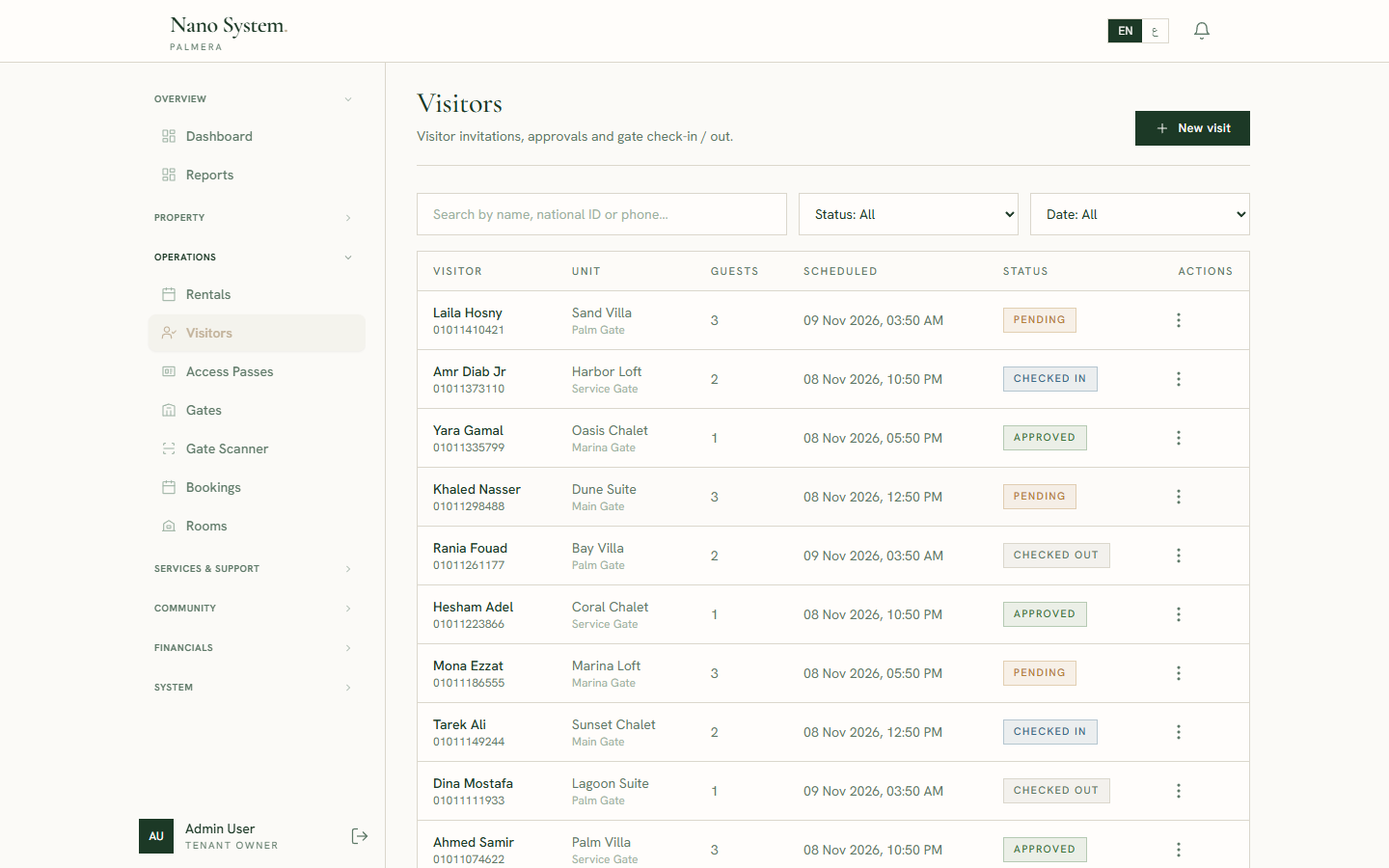
| Manager and staff | Approve visits and rentals, handle service requests, complaints, invoices, announcements | Console: units, visitors, gates, reports |
| Super admin | Create compounds, set plan limits, branding and feature flags | Tenant administration |
Access control uses role-based permissions plus ownership checks. A role alone is not enough: a resident may be allowed to view passes, but only their own. Admin roles are forced into TOTP two-factor login, because an admin account can revoke passes and approve rentals, so a stolen password there is the worst case.
How should invitations, approval rules and rentals be handled?
Short answer: make approval a rule the compound configures, not a hard-coded step, and make overlapping rentals impossible rather than unlikely.
Some compounds let residents invite anyone instantly. Others require manager approval for certain visits, such as overnight guests or contractors. In Palmera, visitor invitations carry an approval status, so staff see what is pending and who has already checked in.
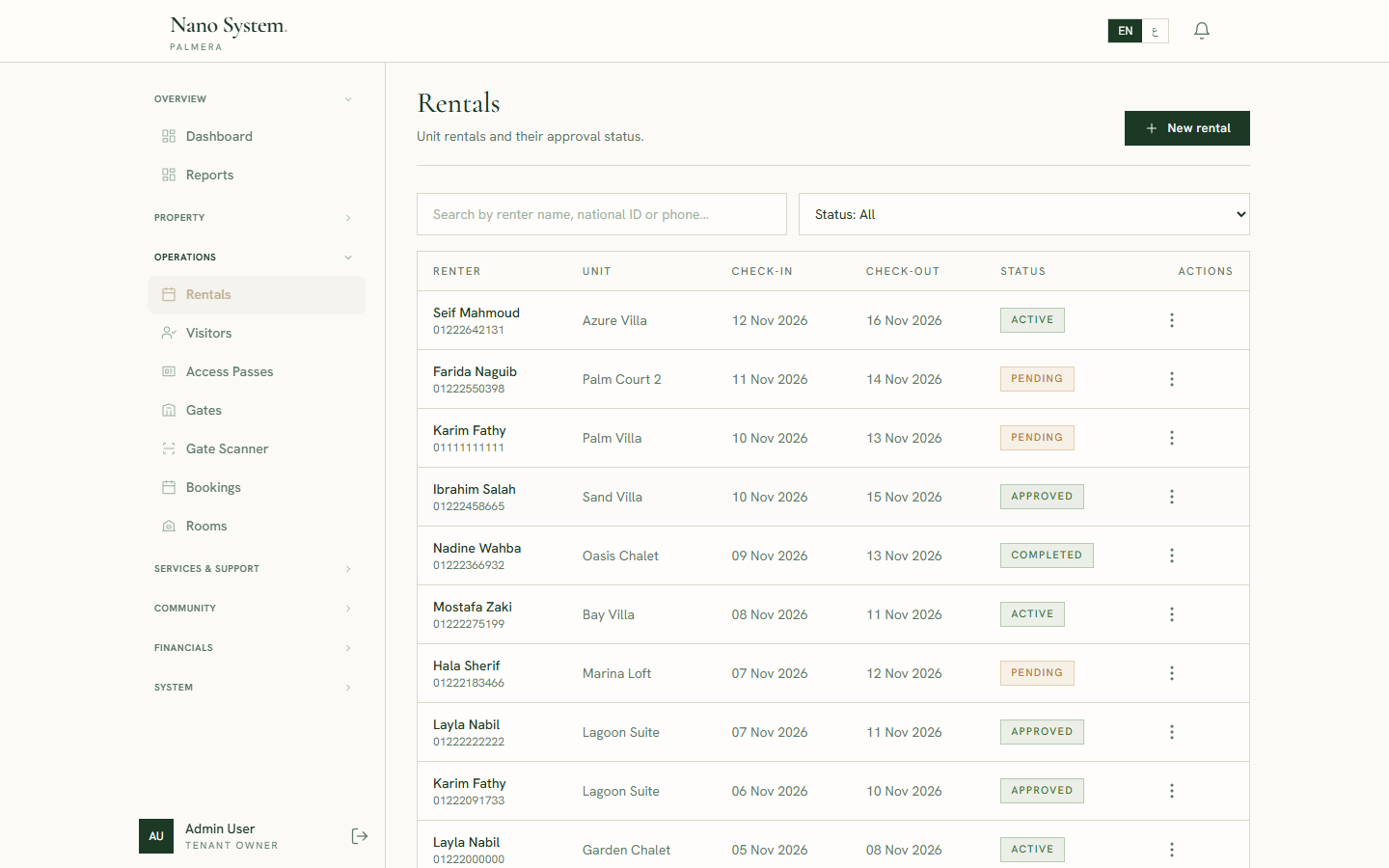
Rentals are the harder case, and they matter for resorts and holiday compounds where owners rent out units short term. Two bookings for the same unit on overlapping dates must not both succeed. Palmera has rental workflows with approval statuses and overlap protection, so a second booking that collides with an approved one is rejected.
A few details I would build in from the start:
- Store units with capacity, nightly price and availability, so a rental request can be checked against real data.
- Tie a renter's guest passes to the rental period, so they stop working when the stay ends.
- Keep a service catalog with request routing, so a maintenance or cleaning request goes to the right team instead of a shared inbox.
How do WhatsApp, SMS and email notifications fit in?
Short answer: notifications go through a driver layer, so the system tries one channel and falls back to others if it fails. Pick the first channel by asking which one your residents actually read; in many markets that is WhatsApp.
Palmera has drivers for the WhatsApp Cloud API, SMS, SMTP email and in-app alerts. Messages come from templates, there is a fallback between channels, and a retry cron picks up anything that failed. A resident gets a WhatsApp message when an approval is needed; if delivery fails, SMS or email follows.
Two practical points. First, WhatsApp business messages use pre-approved templates and Meta charges for them by category, and those rules change, so check Meta's current pricing before you budget. Second, never let the gate depend on a notification: the pass must work whether or not the message arrived. If you want help wiring this up, see my WhatsApp Business API integration service.
How do you keep multiple compounds isolated in one multi-tenant system?
Short answer: put a tenant id on every record and route every query through one helper that filters by it. If developers can write queries by hand without that helper, one forgotten filter eventually leaks another compound's data.
Palmera serves many communities from one database. Each tenant gets its own branding, language, feature flags and plan limits, so one compound can run in Arabic with RTL layout and another in English, with different features switched on. Tenant isolation is enforced through a single scope helper, so every query is filtered by tenantId. The test suite covers tenant scoping and authorization explicitly, because that is the bug you cannot afford to find in production.
It also means a developer or property group can onboard a new compound by creating a tenant, not by deploying a new system. I use the same pattern in SaaS and MVP builds.
How I built Palmera
Short answer: Next.js 16 with the App Router and Server Actions, Prisma on PostgreSQL with about 40 data models, and Arabic and English with RTL. The repository history shows 65 commits over about two weeks in July 2026.
The challenge was threefold: remove personal data from the QR, keep each tenant's data separate, and make the gate work when the connection is weak. Beyond the pass design above, these are the pieces I would insist on for any serious deployment:
- Rate limiting with Redis when it is configured.
- Safe multi-instance running. The app is designed to run behind a load balancer, with health and readiness endpoints, a Docker image and a backup script.
- A fail-closed secrets check at boot. If a required secret is missing, the app refuses to start rather than quietly running unsafe.
- Tests for access passes, tenant scoping, authorization and notifications, plus a GitHub Actions pipeline.
- Operational extras: invoices with printable output, private document storage and a Leaflet map picker for placing gates.

How much does a compound access control platform cost and how long does it take?
Short answer: a focused first version is a few thousand dollars and two to three weeks; a full multi-compound platform with many modules is more. My rate card for multi-tenant SaaS runs $1,500 to $8,000, and custom multi-role systems run $1,500 to $7,000 over three to six weeks.
| Scope | What you get | Typical range | Timeline |
|---|---|---|---|
| Single-compound pass system | Invitations, signed QR passes, gate scanner, audit log, one language | $1,500 to $2,500 | 2 to 3 weeks |
| Multi-tenant platform, phase one | Everything above plus tenants, roles, two-factor for admins, branding, plan limits | $2,500 to $5,000 | 2 to 4 weeks |
| Full operations suite | Rentals, service requests, invoices, WhatsApp, SMS and email engine, reports, Arabic and English RTL | $5,000 to $8,000 | 4 to 6 weeks |
These are estimates inside my published ranges, not fixed quotes. The repository history shows Palmera taking about two weeks, but that was my own product build; a client project adds discovery, content and review rounds. Timeline depends mostly on approval rules, integrations and languages.
If you want a fixed-price starting point, the MVP Sprint package is $2,499 for one core workflow with two user roles in 21 days, listed on the packages page. A compound needs more roles than that, so treat the sprint as a first slice. You can get a quick figure from the app cost calculator. For larger scopes I scope through a short discovery workshop, which is how custom business systems start.
Ongoing costs are small but real: hosting, a PostgreSQL database, an SMS provider, WhatsApp fees paid to Meta, and a monthly care plan ($99 a month) if you want updates and backups handled for you.
If you run or develop a compound and want to replace paper lists and phone calls with passes you can revoke and audit, send me a message with your gate count, roles and the channels your residents use, and I will reply with a scope, a price range and a timeline.


